Keyboard Not Detected on Startup – Requires Reconnection to work (8000 polling / USB Hi-Speed)
This article covers:
A situation where the keyboard fails to power on or type at computer startup, but works after being unplugged and plugged back in and is caused by (8000 polling / USB Hi-Speed).
Note
This problem is limited to the following keyboards that support and have 8000 polling enabled.
- Wooting 80HE
- Wooting 60HE V2
Why does 8000 Polling / USB Hi-speed cause this issue?
Some motherboards' USB controllers may have compatibility issues with USB devices that use the USB Hi-Speed to communicate with the system. This USB standard is required for our keyboards to support the 8000 polling rate.
Troubleshooting & Workarounds
-
Lower the Polling Rate to 1000
Lowering the polling rate to 1000 to see if this resolves the problem and confirms it is related to 8000 polling / USB Hi-speed.
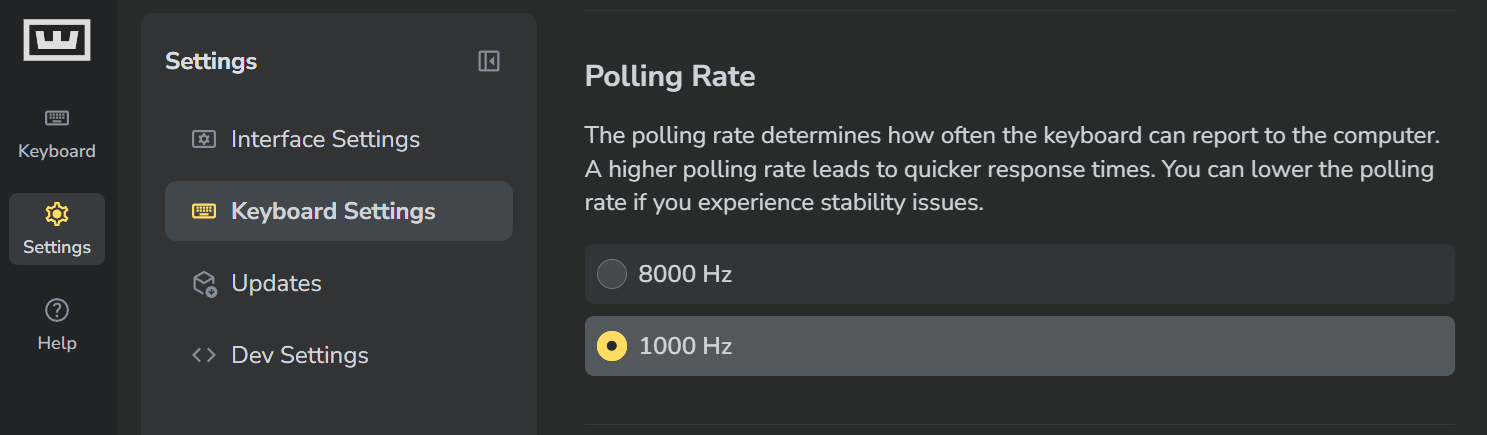
To lower the polling rate, follow the instructions below
- Open Wootility
- Select "Settings"
- Select "keybaord settings"
- under "polling rate"
-
Select "1000 Hz"
When 1000 polling is selected, this changes the USB standard to USB Full-Speed .
-
Try another USB Port
As this problem can be caused by the motherboard USB controller, trying another port can sometimes resolve this problem.
We recommend using ports that are colour-coded differently and located further away from the current port to help ensure the keyboard is not connected to the same USB controller.
